Showing posts with label forex tutorial. Show all posts

Friday, 23 January 2009

“Short Term Trading System” Forex Strategic

“Short Term Trading System” Forex Strategic

This time I will again discuss one of the many Forex Trading Strategy regular me. Strategies that we will be called my "Short Term Trading System." Previous regulations need to know about Short Term Trading in one of the broker popular among Netter. This quotation from the rules they

Maximum number of short-term positions (less than 5 minutes) that can be made by the trader in a 4 hour period is 15. If the trader closes more than 75 short-term positions or more than 300 positions in 7 consecutive days, your account will be prevent trader while a new order of delivery to market. Please note that this restriction refers to the position of both the number of live trading desk and virtual trading. This policy has been applied to restrict the number of positions over the short term that can be executed and the trader to limit the overall number of positions to better control the burden on our servers.

With this strategy we can trade without migrants, always nervous , . heartattack, and etc. Even with a small margin such as $ 200, with this strategy we can wash profit equivalent to the profit if we are trading in the futures account regular local (minimum margin deposit of $ 3000).


Klik gambar untuk memperbesar


The rule is :
Create scenarios Open Open Buy and Sell at the same time, should the Open Price Sell 2 pips above the Open Buy Price. Overall we attach each Target - 8 pips of profit. We wait some time, if one is left out traget (closed) then the position directly opposite that we replace the target, ie, we minuskan / loss (Closed in the loss), with a record profit must be greater than the loss. To help understand the results please see the screenshot trading with us using this way. 3 pairs drawn to BUY and Sell with the calculation of total profit 30pips - 20pips = +10 pips in one hour (see the time entered and exited). Try to imagine if we devote more time to bertrading with this strategy, of course more profit is not it?


Klik gambar untuk memperbesar


If we read carefully the existing regulations, the strategy is far from the violation.

Ebook module in our forex trading, this strategy we describe in as much detail as possible and steps on how to use it. Let's grow the economy suburkan this beloved country with a lot of work


sumber : http://forexon-line.blogspot.com
Strategi Trading Valas 100% Profit (2)


Previously, if we can invite you dreams away, imagine if in the future in all over the city in this beloved land available "machine - an ATM machine" (or whatever the term) that provides information about Forex Rates information runing good price, or a chart another. Dimesin that we can learn forex-trading, from the deposit, open positions, close to the withdrawal. There are several reasons why I have such hope: 

Forex trading is not gambling. 

Trading forex is a business that is very popular. TRADING FOREX market is the largest in the world measured by total transaction value. 

Set the economic, employment reduction, overfullnes MLM business, the needs of life increasing, Trading forex present as independent businesses in a very arouse. Trading forex can be done by anyone, anytime and anywhere. 

Trading forex can be made in the pension business, the age when we are no

    Continuing our strategy that, in the pair Sell EUR / USD, USD / JPY, EUR / JPY when it is saturated above ( choice Buy above, better than Sell below). 


    Following this strategy is a little more "complicated". We have started the On-line Open Market America around 19:20 hours, wait and see with the "battle" U.S. and Europe. It's "battle" that we must be as soulless investment tiger spotted. Tiger spotted if candidates are will sniffing their prey smoothly. Although the flight from mangsanya much faster but he will pounce mangsanya only if it is correct - or close to correct is 99.99%. 


    In this strategy we will be doing the open position SELL EUR / JPY. Between the hours 19:30 to 23:00 we note the chart third pair (EUR / USD, USD / JPY & EUR / JPY). Note the movement chart EUR / USD and USD / JPY, if both are above (both near the high that day) is definitely EUR / JPY will break even over the high. Now when it is the most ideal time to open Sell position. You also do not need to use stop loss. Next movement, if one of the pair EUR / USD or USD / JPY down the EUR / JPY certainly took down, and then move further if both (EUR / USD & USD / JPY) down, then the EUR / JPY is certainly free of earthen jar to hold water and increase - earthen jar to hold water pip profit us.


    sumber : http://forexon-line.blogspot.com

    Strategi Trading Forex / Valas 100% Profit

    Strategi Trading Valas 100% Profit (1)

    We will be sharing about one of the strategies of the many strategies that we "discover" through our experience a few years ago in forex trading. Perhaps some among us have any experience of "negative" in this business. Pointing investment law that the greater level of ROI (return on investment) are in the business any more and the larger the level of risk. Yup, aja realistic, honest kamipun never "drop" in this business, but we remain confident and optimistic with this promising business.
    We also have been on phase "shopping" a lot of e-book2 all about strategy - forex trading strategies offered both online (through internet) and off-line (newspapers, magazines etc.). However, the less we get the maximum already spent a lot of money to buy e-book2.


    Some time later we finally find a strategy - a strategy that not only can reduce the risk in this business, but even we say that our strategy 100% profit. And all we have to apply in the trading and of course we also go through with the sacrifice - of time, energy, and that material.
    Here we will describe a simple strategy that most of the many strategies that we have.

    We prefer trading in the currency pair EUR / USD, EUR / JPY and USD / JPY. Why? fluctuation of price movements because the more dynamic compared with the other part. Do not be surprised if we do not choose the GBP / USD may or GBP / JPY. The reason may be most professional forex trader , we think the average investor is have losr in Trading forex when play in the pair GBP / USD or GBP / JPY.Do You agree?


    ut in the business akan Index / CfDs we must be ready to bear the risk that much greater. Udahlah, forget our mistakes, and do not have our revenge with the defeat. Because it will only make us subject to trading psychology. In the business than we have to avoid the idealist nature, would not accept their own mistakes, you certainly do business in this highly emotional affect our trading results, in this business is very important to consider is the need to patient, calm and confident, and also not too greedy and not too afraid

    We continue to strategy, we prefer to sell rather than buy over under (a special part for the EUR / USD, EUR / JPY & USD / JPY). Because, you see only the movement is the third pair, rise slowly - but if the land is saturated and then fall over very quickly, what this means? Position sell more quickly over the close of trade on the buy down

    We have studied one of the many trading our secure a strategy. As we describe above, we dare say that the strategy - our strategy is 100% profit. For details, you can contact us or come directly to Forex Online Net. Your Happy Trading .....

    sumber: http://forexon-line.blogspot.com

    Thursday, 22 January 2009

    Exit Target, Stop Loss and How to use in Marketiva

    Exit Target, Stop Loss and how to use in Marketiva


    General questions:
    What if I have to always trading, i must seeing a monitor and always connected to the internet? That is possible to close the position when the benefit has been obtained. Hehehe, this is a question of a beginner trader, but we will still answer is yes ... we do not need to waiting the computer all day, I tired your body can left position and later can automatically licuidated if you have set the value of exit target and stop its loss. So you use the time to think about trading like this: 15 minutes of analysis, 10 minutes for order entry and setting the position of exit ordernya. The remaining time can you use day to day activities as usual. So do not you need to intervene again, if the profit target is reached then the exit will be closed, or may not have been losses in tolerir and exit the target price has been left out then the position will also be closed automatically.

    Exit target: the price is the level where you want to close a position when a certain amount of profit you get. You can set the exit target when you open a position or at any time while the position is still open. Exit target is also known by the term or Take Profit is often abbreviated with the TP.

    Stop-loss order: guarantee a position licuidated automatically on the price that has been estimated to limit the potential losses that might occur if the market moves against your position. Stop Loss usual abbreviated SL.

    Sample exit target and stop-loss exit:
    You have opened a long position in the price of 1.2000, then you must exit the target is higher, for example 1.2020, exit and stop-loss at a lower level, for example 1.1980. When you open a short position at 1.2000, target exit value should be lower, for example 1.1980, exit and stop-lossnya higher for example 1.2020.

    Both the exit target and stop-loss exit value that you specify is in the price, not many points, or pip. As the above example, if you want to close the position with 20 pip profit, long in the position that you open with the price of 1.2000, then the exit is a target price of 1.2020 which is open 1.2000 + 20 points = 1.2020.

    Some cases that are often experienced trader associated with the exit target and stop loss
    My position is not closed when I believe the price is the number Exit Target. What actually happened?

    Please note that the price consists of two components, the selling price (Price Bid) and the purchase price (Offer Price).
    Transaction with the selling price is opened and closed with BID Offer Price
    The transaction is opened with the purchase price and the offer closed with price BID
    For example, you make a transaction in the Short EUR / USD and exit the target at 1.3125. Price on the diagram / chart shows 1.3125, but in this case you do not exit the target left.

    This is because the price is 1.3125, which charts an average bid price and offer, the transaction must be closed with Short action to buy. Price Charting = 1.3125, the Offer price in charting = + 1 / 2 spread = 1.3125 + 1.3126 = 1. So that the actual price is still at the 1.3126 level.

    I closed the position when I believe the price does not touch the Stop Loss figures. What actually happened?

    Please note that the price consists of two components, the selling price (Price Bid) and the purchase price (Offer Price).
    Transaction with the selling price is opened and closed with BID Offer Price
    The transaction is opened with the purchase price and the offer closed with price BID
    Example: you make a transaction in the Short GBP / USD and install Stop loss level at 1.8943. Price on the diagram / chart shows 1.8942. But in this case SL you left out.

    This is because the price chart is 1.8942, which is an average bid price and offer, the transaction must be closed with Short action to buy. Price Charting = 1.8942, the Offer price charting = + 1 / 2 spread = 1.8942 + 2 = 1.8944. So the price is actually already on the 1.8944 level.

    Important that you see here is the Spread, and also need to remember that the spread is not fixed and may change when the time value, especially when the news out of the price movement does not lead to stable.

    P.S:

    In the above example, the spread for the EUR / USD is 2, and GBP / USD is 4.
    BID is the price you sell to dealers, and offer is the price you buy from the dealer. In this case, the BID price is always lower than the price OFFE

    sumber :http://belajarmarketiva.wordpress.com/

    How to make a transaction in Marketiva, for begginer only

    How to make a transaction in Marketiva, for beginner only


    o start you should make use margin for the first virtual training / demo trading. 

    Click on the currency pair that will be make transaction . it will be shown an dialog box: Instruments, Price, Duration, Quantity, Exit stop-Loss, Desk, Buy / Sell, Price type, Duration Type, Quantity Type, Exit Target, Text.


    Let us study one by one: 

    • Instruments, Pair is that we are making transaction, can be selected EUR / USD, USD / JPY and so on. 
    • Price, price is usually the darker color, if we choose Price Type "market", meaning the price can not be changed - edit (market price at that time) 
    • Duration is the period of expiration, if we do order transaction. 
    • Quantity, is the large margin we jaminkan. Is a safe margin of 10% of margin in / Capital. For convenience we add a number from 0 to stay behind in our margin. For example in the margin / deposit our capital in 1000, the quantity 10% is a safe means 10,000 each one we pips profit then we will profit of $ 1 => 10% means that the strength of custody if one of our position is 900 pips (depending on the spread of each broker) 
    • Exit stop-Loss, is a limitation if we are wrong pips position (Risk Management). 
    • Desk, is a choice and Virtual Forex Live Forex. Virtual means that our transactions with the simulation / training / demo, Live Forex trading means that we beneran with the margin. 
    • Buy / Sell, Buy or options transactions Sell 
    • Price type, is a Limit order / pending transaction (the trend), Market is if we want the transaction is also (market price), is a stop order / pending transactions (forward trend). 
    • Duration Type, are ignored. 
    • Quantity Type, are ignored. 
    • Exit Target, target profit (at least 7 pips from the price of open position) 
    • Text, ignored it.


    Transaction Buy / Long 

    For example, we will do actions Buy EUR / USD then how: 
    We click on the pair EUR / USD, which we need to fill are: 
    • Instruments => select the EUR / USD 
    • Quantity => 100000 type (without point), that is, each of our 1 pips profit with the same $ 10 
    • Desk => Virtual Forex selected (simulation) Preview 
    • Buy / Sell => Buy selected 
    • Price Type => selected Market 
    Then click ok, then the positions in the layout will look trade position open our long EUR / USD 
    Description: If we do actions Buy / Buy / Long means we want the price rise.

    Illustration action to Buy: 

    When the input rate Euro (EUR) will strong against U.S. Dollar ($), the Euro price will be increased, then we do actions Buy / Buy / Long. If the position of EUR = $ 1.3600 we Buy (Long) with the quantity 100,000. So the calculation of profits if the transaction we close / liquid on the price of EUR / USD = 1.3620 is 
    (1.3620 - 1.3600) x $ 10 = $ 200


    Transactions Sell / Short 

    For example, we will do action Sell EUR / USD then how: 
    We click on the pair EUR / USD, which we need to fill are: 
    • Instruments => select the EUR / USD 
    • Quantity => 100000 type (without point), that is, each of our 1 pips profit with the same $ 10 
    • Desk => Virtual Forex selected (first simulation) 
    • Buy / Sell => chosen Sell 
    • Price Type => selected Market 
    Then click ok, then the positions in the layout will look trade our open positions, Short EUR / USD 
    Description: If we do actions Sell / Sell / Short means we want the price down.

    Illustration action to Sell: 

    When the input rate Euro (EUR) will be weakened against the U.S. Dollar ($), the Euro price will go down, then we do actions Sell / Sell / Short. If the position of EUR = $ 1.3600 we Sell (Short) with quantity 100,000. So the calculation of profits if the transaction we close / liquid on the price of EUR / USD = 1.3570 is 

    (1.3600 - 1.3570) x $ 10 = $ 300


    To Live Forex Transactions / True Trading, then the Desk will stay selected Live Forex. 
    To close the transaction if the profit is it just us, there are 2 ways:
     
    1.liquided / close the open trade position with the manual, how to live click on the layout ID Position Positions => Close => Yes 
    2. With Automatic Target, I click on the layout Position ID Positions => Exit Target fill us => OK 

    For details, you can contact our 24 hour support via email


     support.forexonline@gmail.com atau datang langsung ke Forex-Online Net.

    TRADING STRATEGY WITH INTEREST RATE AND NON PAYROL Farm (NFP)

    TRADING STRATEGY WITH INTEREST RATE
    AND NON PAYROL Farm (NFP)

    Interest Rate (Interest Rate Increase)

    Many argued that the Securities News, to this extraordinary movement of the currency pair. But the author thought that the News Interest in this position as follows:

    * Try before you see the currency pair position in the market when interest news release.
    * If the currency pair is in depressed position, it will be enough to give the effect that extraordinary, but if the currency does not pairnya in the depressed position, it's also the effect is not so great.

    This indicates that the important from the Release Interest Rate "Interest Rate Increase" News is not only itself but the balance of the currency.

    Well, if so ngapain again eforia with Interest Rate, do not sleep until all waiting for its News release, it is better if you do the analysis first rate position with the position of the currency pair is supported.

    Non Farm PayRoll (NFP)

    The Great News Number One in Forex Tradding! Check Your Calender This Month First!


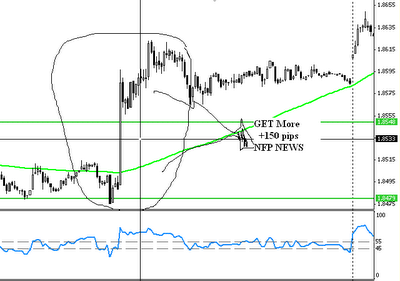
    Try to see the effect of this News, Wuehuehuehe +185 pips in less than 15 minutes only.
    The picture is NFP Securities News on 2 June 2006.

    News what's this ....?!?!??!?
    friends do not need a headache thinking about what this news, that's clear, every Sunday First Friday of each month, this always comes NEWS .... once a month, hours, 20:30 WIB.


    The picture is NFP Securities News on 5 May 2006. You can always see that over 100 pips effect

    News of this effect is always 1 (one) direction rapidly, whether upwards if down, nah I doubt so ... why ..... make it a trap.

    Well, now we try to make a trap .... hehehehe: D

    Strategy:

    * Appears Before News ..... Morning started ... Holiday Trade.
    * Commercial Trade of 30 minutes should come before the News.
    * Place the trap, please see NFP Strategy trap.

    How:

    * Find High & Low transaction 2 hour comes before the News.
    * Please open the HIGH BUY, SELL ago in LOW.
    * Retrieve Target +100 pips only.
    * Take the Stop Lose respectively - only 40 pips.

    Strategy 90% is almost always successful.

    If you are a Trader Standard Account, can actually make a trade here is 1 (one) times a month for the monthly target 100 pips. So in 3 months (only 3 times a trade you have ROI) ... hehehehe ..: D

    The key is:

    * Know When Schedule News NFP will appear this month.
    * Prepare a trap 100 pips in 10 minutes of News comes with the position as I described earlier.
    * If you are already familiar with this trap, use the Quantity 30% of your margin.
    * Enjoy the results and wait for 1 month NFP News Next Month for the next trade.
    * Save your credit, 29 days holiday trade .... hahahaha ....

    Simulation:
    Deposit $ 3000, you trade with $ 1000 (Quantity 10,000), with 1 pips profit = $ 10, with the trade 15 minutes once a month, the 100 pips as a target so that the obtained result is a monthly $ 1000 ..... (10 million bro ..... only 15 minutes to once a month ...)


    sumber : http://mencari-uang-di-internet.blogspot.com/2005/12/petunjuk-lengkap-forex-trading-valas.html

    Wednesday, 21 January 2009

    How to Apply For Marketiva Step by Step

    How to Apply Marketiva Step by Step

    Learn Forex Trading Online forex In that easy, let me show you the steps. Note! Only Suitable For Beginners. 

    If you already understand the basic forex (foreign exchange), please try forex trading professionals who have many features, and we highly recommend you for the professional foreign exchange trader.
     [Silahkan klik di sini untuk Broker Forex Profesional, Aman dan Terpercaya]

    A. To open a free forex trading account or free, Silahkan isi form di SINI.
    In three minutes you will be able to direct trading, you will get $ 5 free gifts and virtual money to practice trading as much as $ 10,000. 

    Important: You must enter personal data correctly, from the Full Name, Address, Phone Number, Zip Code, City and Country. Users who enter false data or origin derived it will be deleted automatically by the system. Each person may only create 1 account only, because if you make more than 1 account, then you will be blocked. Therefore you will be required to enter data according to real ID card (KTP) or Driving License (SIM), as ID cards or driver's license will be uploaded later.
    How the Registration Form: 

    For the field with an asterisk (*) You must fill in, which you can empty the other. 
    Username (*): Use the username / nickname that good, because you'll use to chat with fellow traders, for example: traderfx, etc.. 
    Password (*): your password, at least 8 character combination of numbers and letters. 
    First Name (*): Your First Name 
    Middle Initial: Name your middle initial (1 character), clear the course (if you do not have a middle name) or enter your middle name to Last Name (if you have a middle name) 
    Last Name (*): The name behind you, if your name consists of only one syllable, enter your name in the fields First Name and Last Name. Example: if your name is Johny, then enter the First Name: Johny, Last Name: Johny. 
    Job Title: Leave blank if only the name of the ID / identity card or driving license / SIM you do not have the title or titles to fill in this column (if there is a degree in ID / ID card or driving license / SIM) 
    Organization: Clear 
    Street Address (*): Address in accordance with ID / identity card or driving license / your SIM. 
    Additional Address: Leave blank or you can fill in your address other than those listed in the ID / identity card or driving license / SIM 
    City (*): City in accordance with your ID / identity card or driving license / your SIM 
    Zip / Postal Code (*): Zip Code 
    State / Province (*): for example, West Java Province 
    Country / Region (*): Country 
    Phone (*): Phone Number 
    Fax: Empty 
    Mobile: Clear the contents or cellular phone number with you 
    E-mail (*): Your e-mail address (Must be still active!) 
    Website: Leave blank or fill with your website 
    Click the Continue => 
    Template Users (*): Standard Forex Trader 
    Coupon: Leave blank if you do not have people that you mereferensikan (coupon is not to discount, but only to mark that you are someone downline) 
    Recovery Question (*): Questions to recover your password if you forget, for example what is your pet's name? (What's the name of your pet?) 
    Recovery Answer (*): Best of Recovery on the question, for example: Si Manis Jembatan Ancol, Si Manis Isikankan the Ancol bridge when the animal is your pet Si Manis Jembatan Ancol, suggested answers consist of several words that you easily remember, but difficult to guess by others.

    lick the Next button => 

    Give a check / check / tick on the options: 

    I have read, understood, and agree with the Service Agreement under which it Marketiva Corporation provides products and services. I have also read and understood the Risk Disclosure Statement and I am willing and able to assume such risks. 

    Then click Finish. Process your registration has been completed.


    b. To make a trade, you need Trading Software that can be downloaded from SINI

    After you click to select the "save" and select the directory to put the file in eg Desktop. (Do not use the software / program or download accelerator)
    C. We suggest you do the account identification / confirmation after registering. 

    MUST is not directly and can then follow, but if you use the cafe / cyber cafe to LOGIN BEFORE the trading software, and highly recommended upload ID card (KTP) or Driving License (SIM) that not even Suspended or deleted your account. Unless the computer where you did not register to use another user login to the software tradingnya. 

    Suspended account if you do not then create a new account because it's useless, it is usually a new account will be deleted immediately or Suspended. The only way to activate the account is Suspended Uploading your documents. 

    However we recommend you do as soon as possible after identification register in order to get 2 benefits are: 
    Can withdraw funds 
    Free from suspend / block trading on the computer when the user never used)

    For the identification process, that is needed is 

    Picture Identification: a scan of berfoto identity document, such as driver's license or ID card, with a color JPEG format (more recommended) or at least greyscale / Monochrome (not a photocopy). Maximum file size 100 Kbyte per lembarnya. 
    Identification confirming the customer's address: scan a document that lists your address, for example, phone charges, electricity, or water. NB: If you do not have any documents in the top (point no 2), you can only use the ID card scanning identity saja.Caranya: If you have a new ID card (behind a map image), please upload a scan of KTP front page twice as 1 point 2 at a time in atas.Tapi for which you have the old ID cards, ID cards can upload scanned the front page berfoto as 1 point and upload the page back to include the address as a point 2.

    D. To start trading, please install the trading software that you downloaded before, login, and you can start trading forex

    E. If you want to increase your trading account funds (deposit), there are 2 ways, namely: 

    1. Electronic currency (e-currency) 
    2. Bank transfer (Telegraphic Transfer / Wire) 

    To deposit in the amount of little (less than $ 500) it is better to use e-currency (eg, WebMoney, egold, ebullion, and others) because the e-currency more economical / cheaper if you deposit a little more time and require a short in the process depositnya. 

    If you choose e-currency, we recommend NOT USE:
    E-gold (are problematic because many abuse cases as a money laundering) 
    E-bullion (often freeze accounts without clear reasons, although there are funds in it). 

    We recommend using Liberty Reserve or WebMoney. We recommend that you use Liberty Reserve for less that you understand the computer because the installation procedure WebMoney more complex and need to install the certificate (more suited to use in the home computer / personal page). 
    Please register with Liberty Reserve clicking on the SINI

    o register in WebMoney, please list on the website www.wmtransfer.com (use WebMoney Keeper LIGHT practicality and convenience for the deposit, do not use the Classic Keeper!). 

    But if you do not want to be bothered, can use the inter-bank transfer (Telegraphic Transfer / Wire). Please note if you want to deposit a wire transfer MUST have been doing the identification / verification steps appropriate number 3 above (1x enough). After verification you can start a deposit via wire transfer or Telegraphic fill the form with the deposit wire first. 

    The contents of all data including your bank account no bank do you use your address eg your bank, account no, swift number, etc.. Later this data will be matched when you receive the transfer. Then after that you can do a new transfer from your bank to our bank. Do not forget to mention swift number (bank code) to our bank when you make a transfer at the bank.

    F. If you wish to deposit using Liberty Reserve, you have to buy Liberty Reserve from exchanger (like a merchant selling e-currency).

    So you can just register an account in the exchanger. After registering you can buy Liberty Reserve with how to use the internet banking transfer or bank transfer from manual to your bank account exchanger (Make sure you terpecaya exchanger to make sure you secure the funds, for example:www.juraganegold.com - Buy & Sell a Switch to E-Gold (Egold), Liberty Reserve and WebMoney.

    G. If you wish to deposit using WebMoney (Make sure you use the "Light Keeper", you must purchase in the form of WebMoney WMZ (WebMoney USD) of the exchanger (like a merchant selling e-currency).
    So you can just register an account in the exchanger. After registering you can buy WMZ way transfer using internet banking or manual transfer from your bank to your bank account exchanger (Make sure your trusted exchanger to make sure you secure the funds, for example:
    www.juraganegold.com - Buy & Sell a Switch to E-Gold (Egold), Liberty Reserve and WebMoney.


    Purchase scheme for e-currency deposit: 
    You pay in the form of Rp or USD to your bank account Exchanger>> Exchanger sending e-currency to e-currency account you>> Funds go to e-currency accounts in the form of e-currency (eg, Liberty Reserve).


    scheme e-currency sales to the distribution to e-currency Rupiah or USD: 
    You pay in the form of e-currency accounts to e-currency Exchanger>> Exchanger RP or send USD to your bank account>> funds into your bank account in the form of Rp or USD

    H.  If you have been login to the trading software and still do not understand (confused) can contact the support available to ask. To Malaysia or English, please click on the "Groups" on the top and click on the channel "International Support", and then click OK. Remember not the channel "International". 

    Time forex trading using real money (LIVE) is starting Monday at 4 am WIB (DST) / 5 am WIB (EST) Saturday until 4 am WIB (DST) / 5 am WIB (EST) (When using the New York Time Zone is a Sunday 17:00 to 17:00 Friday). To trade using the money Demo (Virtual) is 7 days a week. 

     Success For Forex Trading forex for you!


    How to make money from forex business forex trading or WITHOUT CAPITAL altogether.

    How to make money from forex business forex trading or WITHOUT CAPITAL altogether.

    Yes correct! NOT YOUR dream! You will give us initial capital of $ 5 you can develop to become a $ 10, $ 100, $ 1000 or is it, after developing and then we allow you to take all the benefits plus $ 5 bonus given previous Free!


    Daftar sekarang juga sebelum kehabisan jatah bonus, this is absolutely free and will be a revolution in your finances! Imagine if the money is not a problem for you! Of course you will be able to do anything, and whenever you want, in whichever you want, and with whoever you want!


    The way the registration step by step clearly can be disini.

    IMPORTANT:
    One person may only create one account, and BONUS PROVIDED ONLY ONE TIMES ONLY
    . So make sure you enter the correct data according to data of identity card or driver's license will be scanned for the ID card / SIM time withdrawal of funds.